
Complete Guide
Fundraising with MailChimp and SmartRaise
How to build a digital fundraising system that converts first-time visitors into recurring donors, recovers revenue you'd otherwise lose, and grows giving over time — using the tools you already have.
Email Fundraising
Email is the highest-ROI channel in digital fundraising, and MailChimp remains the platform most nonprofits use to run it. The segmentation, Customer Journey Builder, e-commerce analytics, and deliverability are genuinely good tools. This guide assumes you're already using them or about to.
What MailChimp Can't Do Alone
MailChimp is fundamentally an outbound communication tool. It sends messages on a schedule or in response to list events. But some of the highest-value moments in donor relationships aren't triggered by a date or a signup - they're triggered by what happens at the point of payment.
The Critical Gaps
When a donor abandons your checkout 80% of the way through, MailChimp doesn't know it happened. When a monthly donor's card expires and payment fails, MailChimp can't send a targeted recovery email with a one-click update link. When a £5-a-month donor has been giving loyally for two years and is likely ready for a £10 ask, MailChimp has no mechanism to send that ask automatically, timed to the right moment in their giving cycle.
Sources: GoCardless Payment Success Index, Baymard Institute
The Solution
The answer is adding a donation and payment layer that handles all of this and feeds the results back into MailChimp so your segmentation stays sharp and your appeals stay relevant. That's exactly what SmartRaise does.
The two-system stack: what each tool is for
The guiding principle is simple: MailChimp handles scheduled, broadcast communication. SmartRaise handles everything triggered by a payment event.
| MailChimp | SmartRaise | |
|---|---|---|
| Sends to | Your whole list, or segments of it | Individual donors, triggered by transaction events |
| Triggered by | Dates, sign-ups, tags, behaviour | Payments, failures, abandonment, subscription changes |
| Knows about | Email engagement, segments, list data | Live payment state, donation amounts, recurring status |
| Key jobs | Appeals, newsletters, welcome series, stewardship | Thank-you emails (often used as membership welcomes), abandoned cart, dunning, upgrade asks, cancellation recovery |
| Data direction | Receives donor and giving data from SmartRaise | Pushes donor and commerce data into MailChimp |
How the data flows
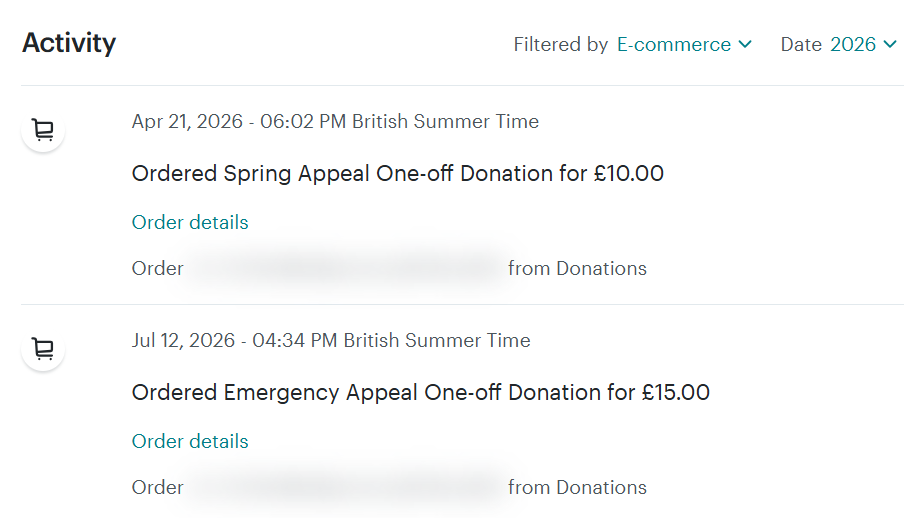
When someone donates through a SmartRaise form, their details — name, email, address, phone, opt-in status, amount given, frequency, payment method, and any campaign tags — flow automatically into MailChimp. Because this data populates MailChimp Commerce, it becomes available for segmentation and personalisation using MailChimp's full e-commerce segment builder, just as purchase data would for an online shop. MailChimp treats donations as orders and donors as customers, which unlocks conditions like Amount spent in total, Purchase date, and pre-built segments like Recent Customers, First-time Customers, and Lapsed Customers — all directly useful for fundraising.
Your data, your tag dictionary, and setting up a campaign
Good campaigns are built on clean data and consistent naming. Both are decisions you make before your first send — and both are almost impossible to fix cheaply after the fact.
What data you need before you send anything
Once the SmartRaise–MailChimp Commerce sync is live, every donation flows into MailChimp as a purchase record. You get automatically: email address, first name, last name, donation amount, date, frequency, payment method, and any tags applied by the SmartRaise form.
What it doesn't give you: anything that predates the integration. Import each contact's most recent gift date and amount as custom audience fields before your first segmented campaign, or your segments will be wrong from day one.
Before sending, confirm three things: explicit email opt-in recorded for every contact you plan to reach; a default value set for the FNAME field in MailChimp (so "Hi ," never appears); and the Commerce sync tested with a real donation appearing as an order in a contact's profile.
Technical setup note: Your technical team will need to handle domain authorisation in SmartRaise (Globals > Authorisation), branding (Globals > Branding), custom send address registration via Mailjet, and SPF/DKIM DNS records. Contact hello@brandresponse.cc — the SmartRaise team will walk you through it. The rest of this guide assumes that plumbing is done.
MailChimp audience structure — a quick primer
MailChimp uses four distinct structures. Confusing them causes problems:
- Audience is everyone. You should have one audience, not multiple — splitting contacts makes cross-segment sending and reporting impossible.
- Tags are labels you apply to contacts to record facts: what campaigns they responded to, what state they're in, what forms they've used. Tags are the backbone of your attribution system — and what SmartRaise pushes in with every donation.
- Groups are subscriber-facing preference categories. Let subscribers manage these via a preference centre. Don't use groups for internal attribution.
- Segments are saved filters combining tags, groups, Commerce data, and custom fields into reusable audience slices.
The pattern that works: one audience, tags for attribution and donor state, groups for subscriber preferences, saved segments for targeting.
Your tag dictionary — decide this now, not later
Tags are only useful if they're consistent. winter-appeal-2026, winter2026, Winter 2026, and WinterAppeal26 are all different tags in MailChimp — attribution becomes a mess within three campaigns.
Format: [category]-[descriptor]-[year/quarter] — all lowercase, hyphens only.
Appeal tags
| Tag | When to apply |
|---|---|
| appeal-winter-2026 | Winter fundraising appeal |
| appeal-emergency-2026 | Emergency/crisis appeal |
| appeal-eoy-2026 | End-of-year giving push |
| appeal-spring-2026 | Spring campaign |
Donor state tags
| Tag | When to apply |
|---|---|
| donor-recurring | All monthly/yearly subscription donors |
| donor-oneoff | All one-off gift donors |
| donor-lapsed | After 12+ months with no gift |
| donor-new | First gift (can automate via Customer Journey) |
| donor-upgraded | Accepted an upgrade ask |
Segment / track tags
| Tag | When to apply |
|---|---|
| track-welcome | Entered welcome journey |
| track-reactivation | In a lapsed-donor re-engagement sequence |
| track-major-prospect | Flagged for major donor cultivation |
| track-upgrade-sent | Received an upgrade ask this cycle |
Source tags
| Tag | When to apply |
|---|---|
| src-email | Donated via an email campaign link |
| src-social | Donated via a social media link |
| src-web-organic | Donated directly from website |
| src-partner | Donated via a partner referral |
Setting up a campaign in MailChimp: step-by-step
- Create the campaign. Go to Campaigns > Create campaign > Email > Regular email. Give it an internal name that will make sense in six months —
Winter Appeal 2026 – Existing Donorsis better thanNewsletter Dec. - Choose your recipients. In the To field, click Add a segment. For a winter appeal to active one-off donors who aren't already monthly:
Tag > is > donor-oneoffANDTag > is not > donor-recurringANDPurchase activity > Timeframe > is within the last > 365 days. Save the segment so you can reuse it. - Fill in campaign info. From name: a named individual outperforms an org name in open rates for appeal emails. Subject: write last, aim under 50 characters. Preview text: a continuation of the subject, not a summary.
- Add tracking. Turn on opens, clicks, and e-commerce link tracking. Add UTM parameters:
utm_source=mailchimp,utm_medium=email,utm_campaign=winter-appeal-2026. - Build the email. Use the SmartRaise Email Builder to generate ready-to-paste HTML — enter your brand colour, form slug, copy, and impact amounts, then copy the output directly into MailChimp's Code your own editor.
- Schedule or send. Tuesday and Wednesday mornings typically perform best for fundraising appeals — your own data will tell you more than any benchmark.
- Tag respondents. After sending, build a Customer Journey triggered by "clicked any link in [this campaign]" → Add tag:
appeal-winter-2026-clicked. Lets you follow up with engagers who didn't donate.

Build your appeal email
Use the SmartRaise Email Builder to generate a finished, MailChimp-ready appeal email in under five minutes. Enter your brand colour, form slug, copy, and per-amount impact statements — the builder constructs a mobile-responsive, table-based email with correctly formatted prefill URLs and MailChimp merge tags already in place. Switch to the HTML tab, copy the output, and paste it into MailChimp's Code your own editor.
What the builder handles for you: personalised salutation with *|FNAME|* fallback; per-amount donation buttons with prefilled SmartRaise URLs (amount, frequency, payment method, and campaign tags); a secondary monthly giving link; and a compliant footer with unsubscribe and update-preferences links.
Building a donation form that converts
Your form is the point where a warm intention becomes actual revenue — or doesn't. SmartRaise's form builder includes a rich set of conversion features that nonprofits can use to improve completion rates and grow recurring giving.
Amount buttons and the default selection
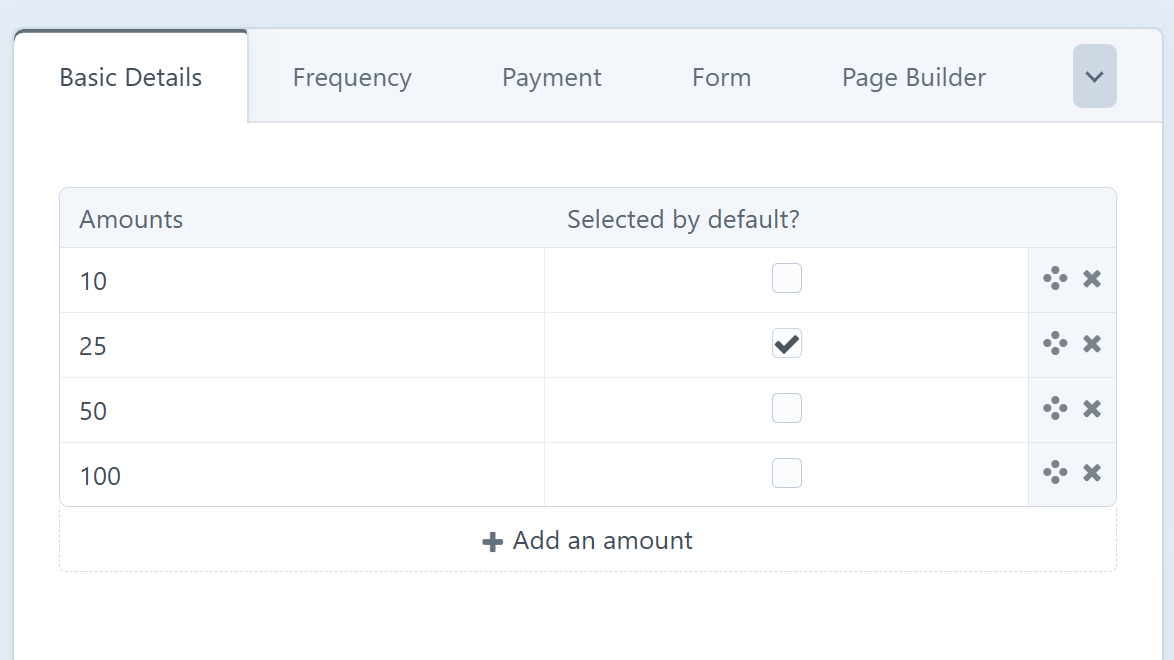
Under the Basic Details tab, set four to six donation amount buttons. The real lever is the default selection — pre-selecting one amount so it's highlighted when the donor arrives. If your average gift is £15, pre-selecting £25 nudges upward without feeling pushy.
Frequency: push monthly
Recurring giving is the single highest-leverage lever in nonprofit fundraising. Use SmartRaise's nudge message — a line of text below the frequency buttons pointing to the monthly option. Pre-select monthly as the default, and use clear, value-led option labels and nudge copy to reinforce the monthly choice, for example: Most supporters choose monthly to create steady year-round impact.
Payment method: push Direct Debit
Direct Debit has materially lower failure rates than card, lower transaction costs, and stickier long-term retention because it isn't affected by card expiry. SmartRaise lets you de-emphasise card so it appears as a smaller link under the Direct Debit button. For faster GBP payments, enable Instant Bank Pay via GoCardless.
Fields: collect only what you need
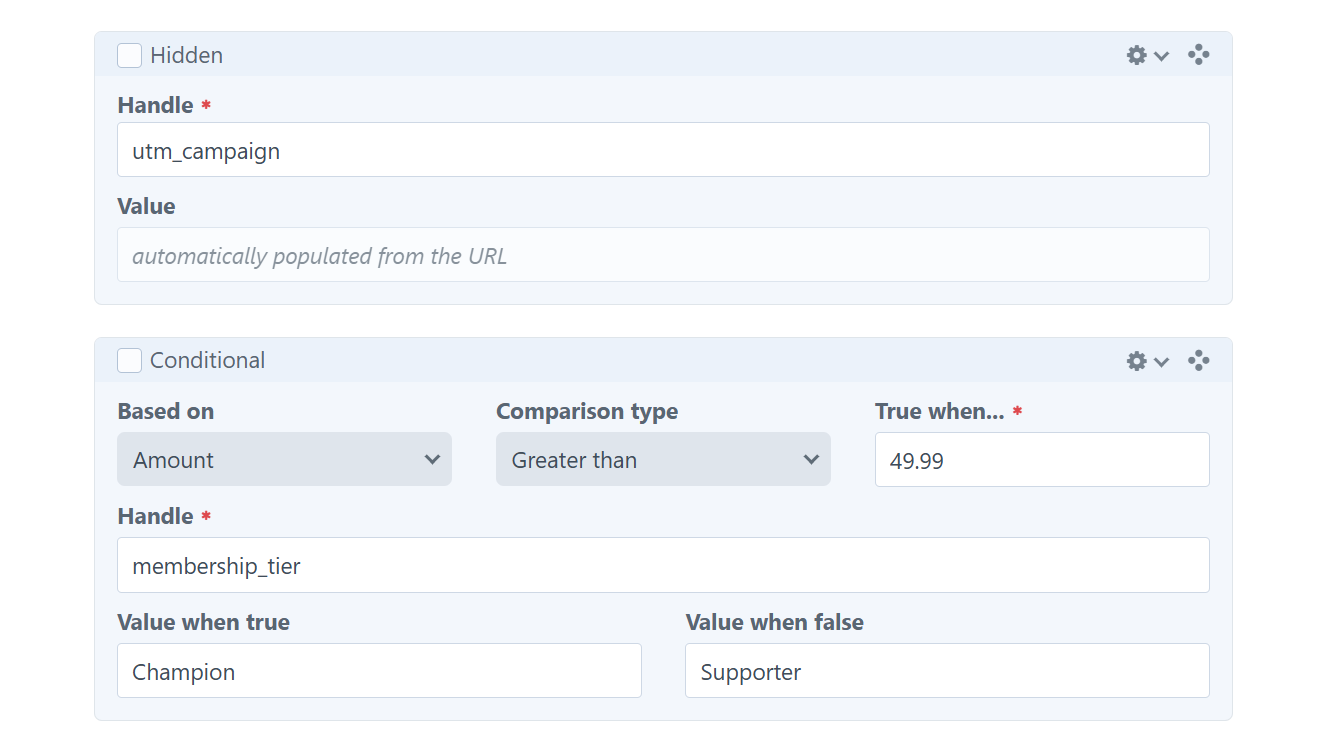
First name, last name, email, and email opt-in cover the essentials. Two advanced types are worth knowing: Hidden fields silently record values (e.g. utm_campaign from the URL) against every donation. Conditional fields record different data depending on what the donor enters elsewhere.
Segmentation in MailChimp using your SmartRaise data
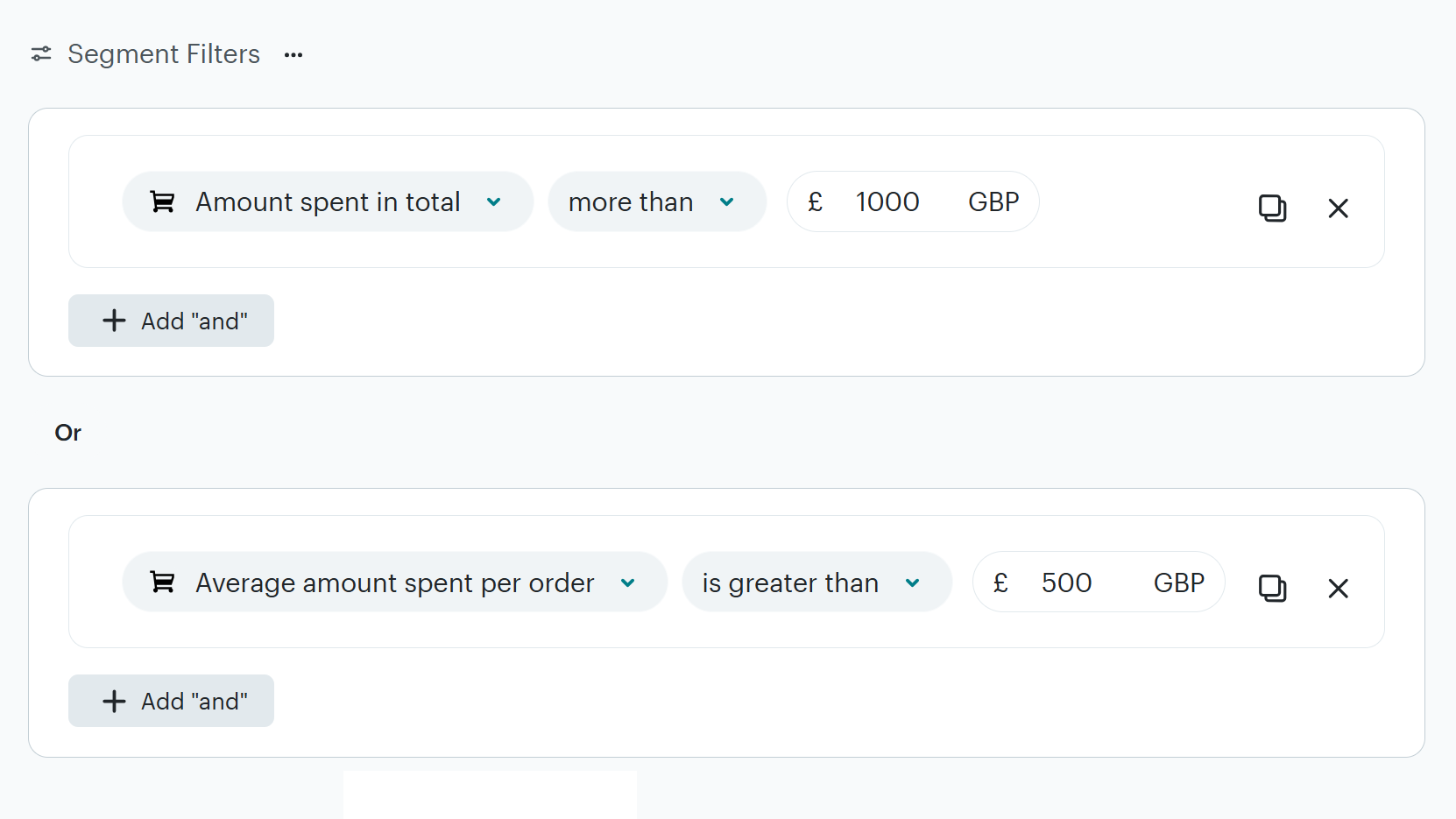
With SmartRaise data flowing into MailChimp Commerce, every donation appears as a purchase record on the contact's profile. In the segment builder, the conditions you'll use most are under E-commerce activity: Amount spent in total, Amount per order, Purchase date, and Total number of orders.
Pre-built segments to start with
MailChimp auto-generates these once Commerce data is flowing — find them under Audience > Segments:
- Potential Customers — haven't donated yet (your engaged non-donors)
- Recent Customers — donated in the past 30 days
- First-time Customers — just made their first donation
- Repeat Customers — made two or more donations
- Lapsed Customers — haven't donated in the past eight months
Rename them to nonprofit language in the UI ("Recent Donors", "First-Time Givers") so your team knows what they're working with.
Core custom segments to build
| Segment | Conditions | Use for |
|---|---|---|
| Active recurring donors | Tag > is > donor-recurring |
Exclude from one-off asks. Impact updates only. |
| Mid-tier donors | Amount spent in total > £250 | Upgrade asks, stewardship |
| Major donor prospects | Amount spent in total > £1,000 OR Amount per order > £500 | Personal cultivation, not mass sends |
| Deeply lapsed | Have purchased + have not purchased in last 18 months | Dedicated re-engagement track |
| Engaged non-donors | Opened last 5 emails + have not purchased | First-gift campaign |
| By appeal source | Tag > contains > appeal-winter-2026 |
Follow-up, attribution reporting |
Plan tier note: The basic segment builder (Free & Essentials) caps at 5 conditions per segment. Unlimited nested conditions require Standard or above — worth it once you're building proper RFM segments.
Writing appeals that convert
The anatomy of an appeal
A strong appeal does three things in order: opens with a concrete hook (a person, a place, a number), makes an ask that feels proportionate, and gives one clear CTA that takes the reader straight to giving. One story, one ask, one button near the top.
The prefill tactic: MailChimp links that skip to a pre-filled form
SmartRaise forms support URL parameters that pre-fill fields. Combined with MailChimp merge tags, you can send an email where clicking donate lands the reader on a form with their name, email, amount, frequency, and payment method already filled in — straight to payment, one click away. Use the SmartRaise Email Builder to generate a finished, MailChimp-ready appeal email with pre-fills.

Prefill URLhttps://cms.smartraise.net/yourform?email=*|EMAIL|*&firstName=*|FNAME|*&lastName=*|LNAME|*&amount=25&frequency=monthly&method=gocardless&tab=2&tags=winter-2026,src-email
| Parameter | What it does |
|---|---|
email=*|EMAIL|* | Pre-fills donor's email from MailChimp merge tag |
firstName=*|FNAME|* | Pre-fills first name |
amount=25 | Pre-selects the £25 button |
frequency=monthly | Pre-selects monthly option |
method=gocardless | Pre-selects Direct Debit |
tab=2 | Skips straight to payment tab |
tags=winter-2026 | Tags the donation for attribution in MailChimp Commerce |
Forking the URL by segment
Use prefill form links for one-off, reactivation, or first-gift asks.
| Segment | URL params to use |
|---|---|
| First-time donors | ?amount=35&frequency=one-off&tab=2&tags=winter-2026,new-donor |
| Active one-off donors | ?amount=50&frequency=one-off&tab=2&tags=winter-2026,oneoff-active |
| Lapsed donors | ?amount=25&tab=2&tags=winter-2026,reactivation |
| Mid-tier donors | ?amount=100&tab=2&tags=winter-2026,mid-tier |
Recurring donor note: For existing recurring donors, use SmartRaise's upgrade flow rather than a prefill donation link so supporters increase their current subscription instead of creating a second monthly payment.
The automation layer: what SmartRaise handles that MailChimp can't
These emails are triggered by payment events, contain live payment data, and are sent by SmartRaise — not MailChimp. Configure them in your SmartRaise account under Emails and Nudge Automations, and they run in the background recovering revenue that would otherwise vanish.
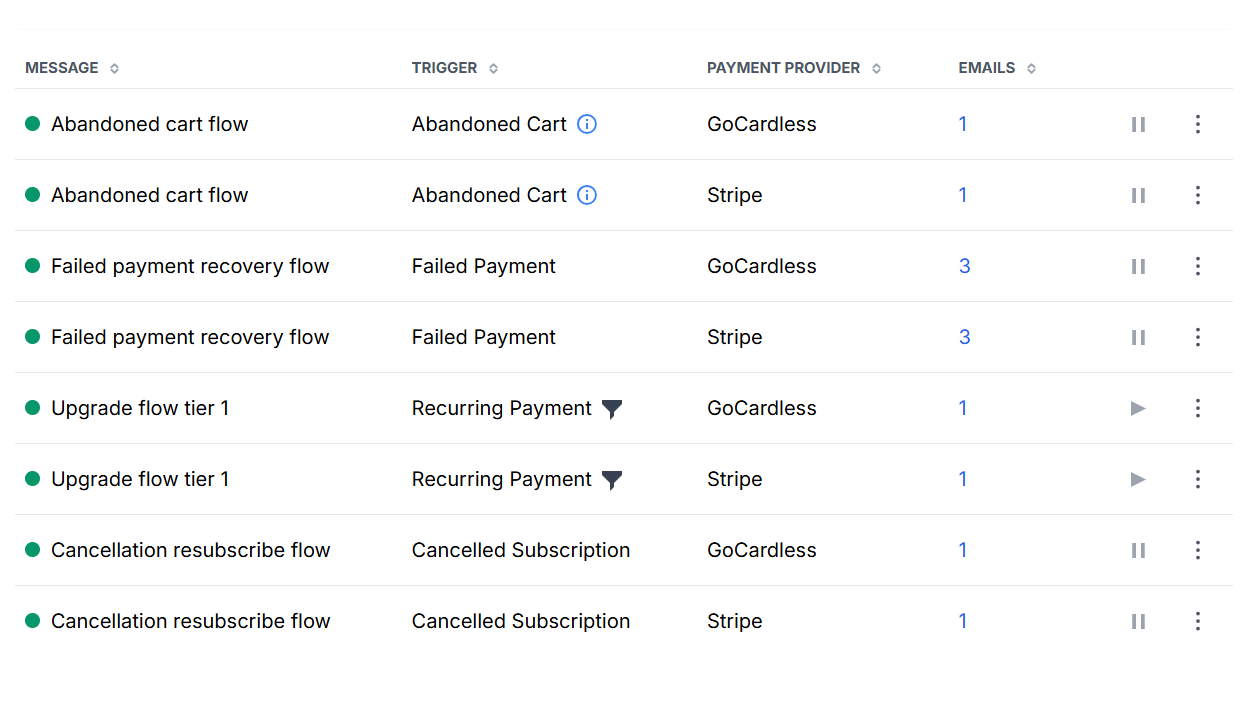
| Automation | Trigger | What it does |
|---|---|---|
| Thank-you emails | New one-off payment / new subscription | Personalised welcome messages. Separate templates for one-off and recurring. Edit to sound like your org. |
| Abandoned cart | Checkout started but not completed within 24 hours | Returns donor to checkout in same state — amount, name, email all pre-filled. One-click to complete. |
| Failed payment recovery | Payment fails after all retries | 3-email sequence: immediate, +5 days, +15 days. Each links to a one-click payment update flow. |
| Upgrade flow | Recurring payment (every 6 months per donor) | 4 tiered emails based on current giving amount. One-click upgrade buttons in each email. |
| Cancellation / resubscribe | Subscription cancelled | Offers to continue at 75%, 50%, 25%, or 10% of previous giving. Smart amounts, one-click resubscription. |
Upgrade flow tiers
| Tier | Current giving | Suggested amounts |
|---|---|---|
| Tier 1 | Under £5/month | £5, £10, £20, £50 |
| Tier 2 | £5–9.99/month | £10, £20, £50 |
| Tier 3 | £10–19.99/month | £20, £50 |
| Tier 4 | £20–49.99/month | £50, £100 |
Welcome series: where MailChimp does the work instead
One automation that sits on the MailChimp side: a welcome series for new supporters. Use Customer Journey Builder (Standard plans and above) triggered by "contact added to audience" or "tag applied." Typical flow: immediate welcome → impact story at 3 days → soft first-gift ask at 7 days.
Tracking, attribution, and closing the loop
- UTM parameters on every link. Minimum:
utm_source=mailchimp,utm_medium=email,utm_campaign=winter-2026. Google Analytics attributes revenue back to campaigns automatically (when using conversion tracking). - SmartRaise
tagsparameter for donation-level attribution. Tags flow to MailChimp Commerce so you can report revenue by appeal within both tools. - Hidden form fields to capture UTM data into the donation record itself. Add fields with handles
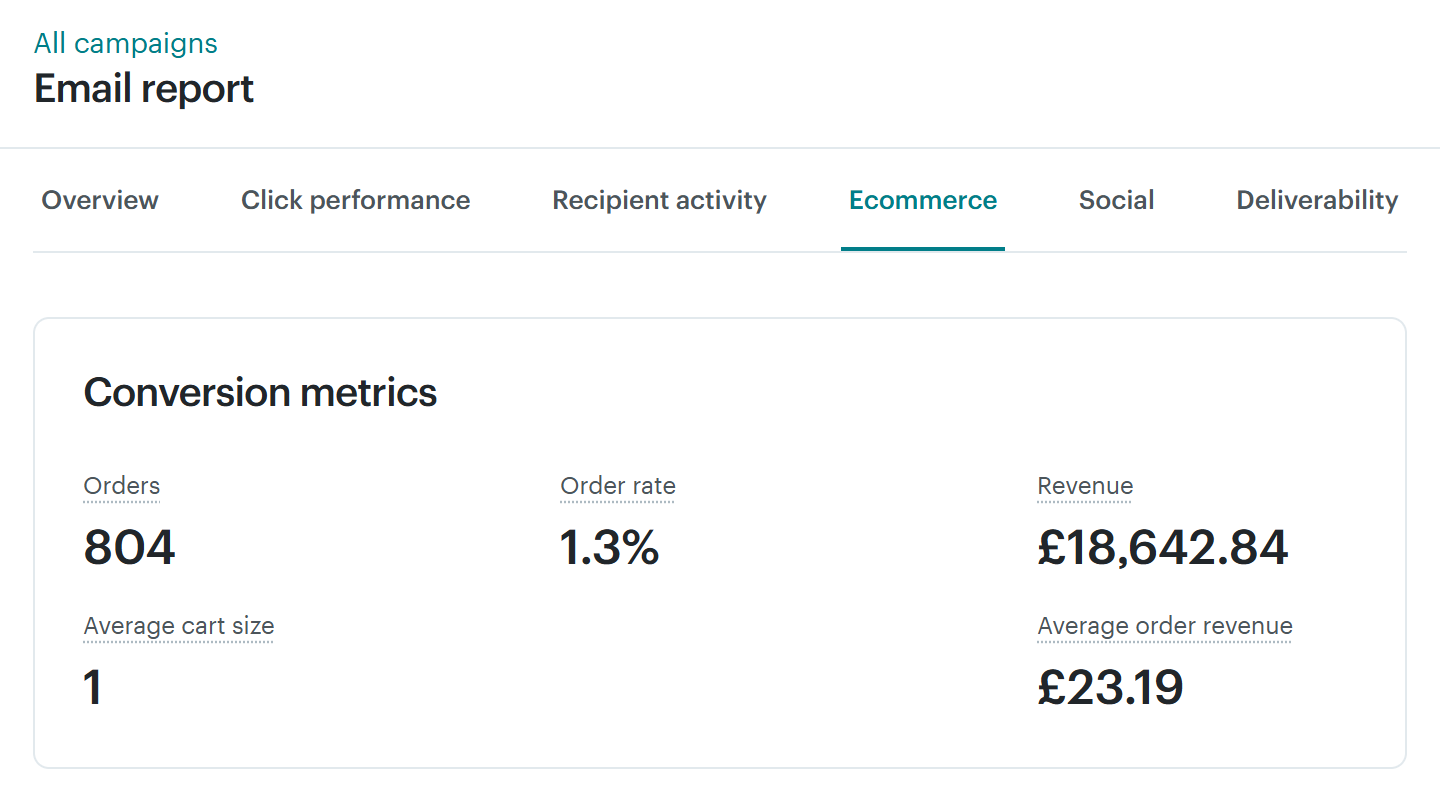
utm_sourceandutm_campaign— every donation carries its acquisition source forever. - MailChimp's built-in revenue reporting. Once e-commerce tracking is connected, campaign reports show total revenue, average order value, and which contacts donated — the easiest "did this appeal work?" answer available.
Metrics worth watching monthly
- Average gift size—split by one-off and monthly
- Recurring conversion rate—% of donors choosing a monthly option
- Abandoned cart recovery rate—% of abandoned checkouts recovered
- Failed payment recovery rate—% of failed recurring payments recovered
- Upgrade uptake—% of recurring donors accepting an upgrade ask
- Lapsed recovery rate—% of lapsed donors giving again after re-engagement
These six numbers tell you more about the health of your digital fundraising than open rates ever will.
Testing and iterating
The nonprofits that grow their digital fundraising year over year are, almost without exception, the ones that test. The ones that stagnate assume their first version is their best version.
- Test one thing at a time. Change one variable per test. MailChimp's built-in A/B testing (Essentials and above) handles subject line, from name, content, or send time with automatic winner selection.
- Test things that matter. Ask amount, frequency default, and first-screen copy produce bigger lifts than subject lines or font choices.
- Give tests enough volume. A test going to 200 people will almost never reach significance. Aggregate across campaigns if you lack volume.
- Review quarterly. Block a morning every three months to review segment performance, automation results, average gift trajectory, and channel mix.
Your 30/60/90-day action plan
Days 1–30 · Foundation
Authorise your domain in SmartRaise. Apply branding. Register your custom email send address via Mailjet, configure SPF and DKIM in DNS. Confirm MailChimp Commerce sync with a test donation. Review your donation form: set default amount, enable fee-covering, configure frequency nudge message, de-emphasise card in favour of Direct Debit, add hidden UTM fields. Edit SmartRaise thank-you emails to sound like your organisation. Activate the abandoned cart and failed payment automations.
Days 31–60 · Segmentation & appeals
Rename MailChimp's pre-built e-commerce segments to nonprofit language. Build the core custom segments: active recurring, mid-tier donors, major donor prospects, deeply lapsed, engaged non-donors. Write and send your first segment-specific appeal using prefill URLs — start with two variants (active one-off donors vs. lapsed). Verify SmartRaise tags are flowing through to MailChimp Commerce and appearing in segment filters.
Days 61–90 · Automations & iteration
Build a welcome series in MailChimp Customer Journey Builder for new signups. Activate the SmartRaise upgrade flow with edited content that matches your voice. Review the cancellation email and tailor the resubscribe flow. Run your first A/B test on a meaningful variable. Pull a month-on-month comparison of your six core metrics. Book a quarterly review for 90 days out.
Do this and you'll have a working, measurable, compounding digital fundraising system — one where every moving part is doing the job it's best at, and the revenue you were leaving on the table comes home.
Further reading
- SmartRaise support — request customer documentation and setup guidance
- MailChimp advanced segmentation — for deeper segment logic
- MailChimp conditional merge tags — the syntax reference
- MailChimp Customer Journey Builder — for welcome series and other journeys
- MailChimp e-commerce segment options — all purchase-based conditions
Questions about setup? The SmartRaise team is at hello@brandresponse.cc and happy to help.


