
Complete Guide
Fundraising with Salesforce and SmartRaise
How to turn your Salesforce CRM into a complete nonprofit fundraising system — combining donor intelligence and predictable revenue reporting with the payment automation layer that drives recurring income and reduces churn.
The Salesforce advantage for nonprofits
Salesforce is the most widely used CRM in the nonprofit sector, and for good reason. Its Nonprofit Cloud (formerly the Nonprofit Success Pack, or NPSP) was built specifically for organisations that manage donor relationships, track campaign performance, run programmes, and report to boards — all from a single platform.
What Salesforce does better than almost anything else:
- A complete donor record. Every touchpoint, gift, appeal response, and programme interaction in one place. A fundraiser can see a donor's full relationship with your organisation in under 30 seconds.
- Household and relationship mapping. Nonprofit Cloud's Household model links individuals to their family unit, so you can see combined household giving rather than individual giving in isolation — critical for major donor identification and stewardship.
- Flexible reporting and dashboards. LYBUNT and SYBUNT reports, lifetime value tracking, recurring income forecasting, campaign performance analysis. Salesforce's report builder is powerful once your donation data is clean and consistently structured.
- Organisation-wide workflow automation. Flow Builder can trigger internal tasks, update records, and alert relationship managers based on donor activity — all without custom code.
These capabilities are genuinely difficult to replicate elsewhere. If your organisation is already on Salesforce, or considering it, that investment is well placed. But there is a gap — and it's a costly one.
What Salesforce can't do alone
Salesforce is, at its core, a record-keeping and reporting platform. It's designed to receive data, store it intelligently, and surface it when you need it. What it isn't designed to do is originate action in real time in response to a payment gateway event.
The payment event problem
The most valuable moments in a donor's lifecycle aren't triggered by a calendar date or a list import — they're triggered by what happens at the payment layer. And Salesforce has no native connection to GoCardless or Stripe.
Consider what that means in practice:
- A donor reaches your donation form, enters their details, and abandons the checkout. Salesforce never knew it happened — there's nothing to recover.
- A monthly donor's Direct Debit payment fails because their bank account changed. Salesforce records the failure if you've built the integration to push that event in — but sending a recovery email with a one-click re-authorisation link requires a custom integration between your Salesforce environment and the GoCardless API.
- A donor has been giving £10 a month for two years and is statistically ready for an upgrade ask. Sending that email at exactly the right point in their giving cycle — not too soon, not a year too late — requires scheduled Apex code, a complex Flow, or a Marketing Cloud journey that someone has to design, build, and maintain.
- A recurring donor cancels their subscription. A personalised resubscribe email, timed to land at the right moment and offering smart lower-amount options, requires yet another custom build.
None of these are impossible to build in Salesforce. They're just expensive, slow to implement, and fragile to maintain — particularly for small and mid-sized fundraising teams without a dedicated Salesforce developer on staff. And while the build is underway, the revenue those automations would have recovered keeps walking out the door.
Sources: GoCardless Payment Success Index, Baymard Institute
Each number above represents revenue that is either being missed or lost without a dedicated payment-event action layer. SmartRaise is that layer — and it connects directly to Salesforce so every donation, subscription, and payment event lands in your CRM automatically.
The two-system model: what each tool is for
The most effective nonprofit fundraising setups separate two distinct jobs: Salesforce handles donor intelligence and reporting. SmartRaise handles payment conversion and the automations triggered by what happens at the payment layer. They're not alternatives — they work better together than either does alone.
| Capability | Salesforce | SmartRaise |
|---|---|---|
| Donor contact records & giving history | ✓ Native CRM | Pushes data in |
| Household & relationship mapping | ✓ Nonprofit Cloud | Pushes data in |
| Donation reporting & dashboards | ✓ Report Builder | ✓ SmartRaise Insights (donations view) |
| LYBUNT / lifetime value segmentation | ✓ Custom reports | ✓ SmartRaise Avg Gift Values |
| Major donor identification | ✓ Via reports & list views | ✓ SmartRaise Insights (donations view) |
| Donation forms & payment processing | — | ✓ Stripe + GoCardless |
| Abandoned checkout recovery | Requires custom dev | ✓ Built-in (fires after 24 hrs) |
| Failed payment recovery | Requires custom dev | ✓ Built-in (3 automated reminders) |
| Subscription upgrade asks | Requires custom dev | ✓ Built-in (every 6 months) |
| Resubscribe flow on cancellation | Requires custom dev | ✓ Built-in (smart lower-amount options) |
| Donation thank-you emails | Requires custom dev | ✓ Built-in |
| Platform fees | — | ✓ 0% |
How the data flows
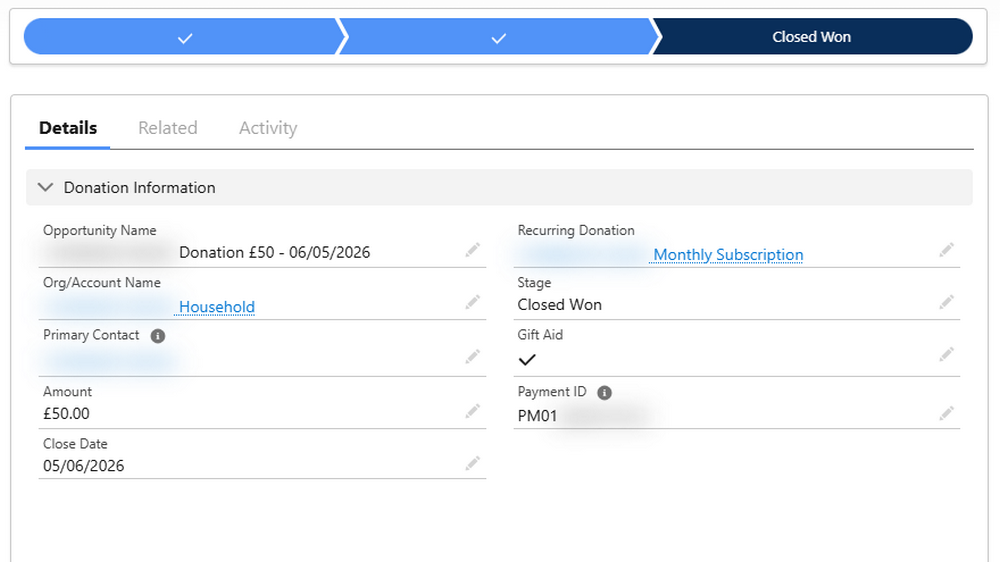
Every time someone donates through a SmartRaise form — a one-off gift or a recurring subscription — their details are pushed automatically into Salesforce. SmartRaise checks whether a Contact already exists by matching on email address, updating the existing record rather than creating a duplicate. If no Contact is found, a new one is created. Donation details are recorded as Opportunities, linked to the Contact. Recurring subscriptions are represented as Recurring Donation objects in Nonprofit Cloud, with each subsequent payment linked back to the parent subscription record.
The integration is one-way: SmartRaise pushes to Salesforce. From Salesforce's perspective, SmartRaise-sourced donations are indistinguishable from any other donation record — fully available for reporting, segmentation, workflow automation, and stewardship.
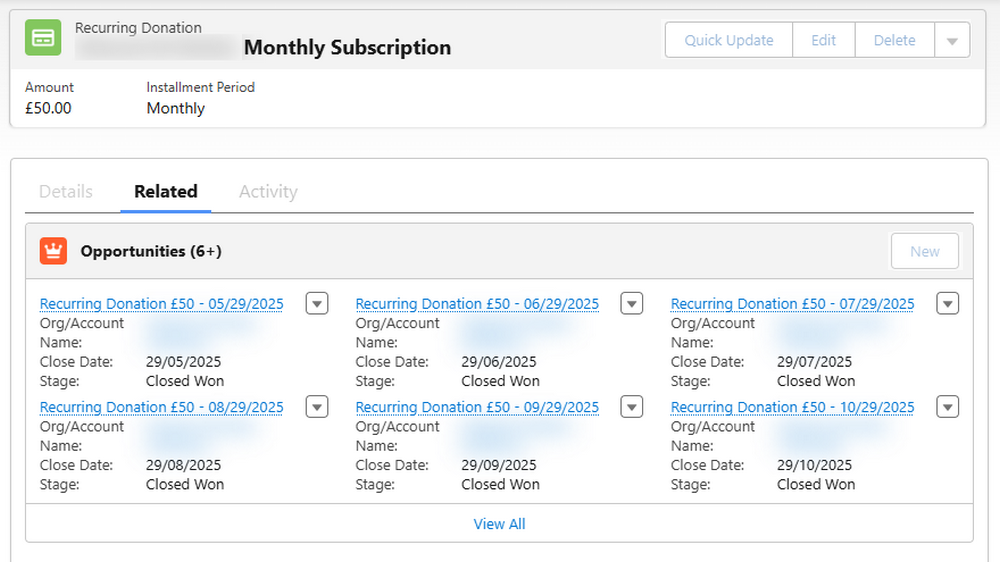
The Salesforce data model: Contacts, Opportunities, and Recurring Donations
SmartRaise maps cleanly to Salesforce's standard nonprofit data model. Understanding what gets recorded where — and why — makes configuration straightforward and ensures your reporting is accurate from day one.
| SmartRaise event | Salesforce object | Fields populated |
|---|---|---|
| Donor submits a form | Contact | First name, Last name, Email, Phone (if collected), Address (if collected), Email opt-in status. Matched on email address — updates existing record or creates new. |
| One-off donation | Opportunity | Amount, Currency, Close date, Payment ID (Stripe or GoCardless), Payment method, Stage (Closed Won for card; Pledged for Direct Debit — see next section), Gift Aid opt-in (UK organisations). |
| New recurring subscription | Recurring Donation (Nonprofit Cloud) | Amount, Frequency (monthly/yearly), Start date, Payment method, Status (Active). Linked to the Contact and to the Household Account. |
| Each subscription payment | Opportunity | Amount, Close date, Payment ID, Stage. Linked to both the Contact and the parent Recurring Donation object. |
Nonprofit Cloud vs. Sales Cloud
If your organisation uses Salesforce Nonprofit Cloud (formerly NPSP), the Recurring Donation object is available out of the box — purpose-built to manage the relationship between a subscription and its constituent payments, and fully supported by SmartRaise's integration. If you're on standard Sales Cloud, recurring giving can still be represented using a series of linked Opportunities, but Nonprofit Cloud's model is cleaner, better suited to individual giving programmes, and what we recommend for any organisation with recurring donations at its core.
Setup note: Your Salesforce Admin will need to confirm the correct field mappings for your organisation — particularly any custom fields you've added to Contact or Opportunity. The SmartRaise team handles the integration configuration and will work through field mapping with you before go-live. Contact hello@brandresponse.cc to get started.
The donation lifecycle: Pledged, Closed Won, and Closed Lost
Not all donations confirm instantly. Direct Debit payments — processed via GoCardless and the UK BACS scheme — take several business days to clear. SmartRaise reflects this accurately in Salesforce so your pipeline and income reports remain clean and trustworthy throughout.
Card payments (Stripe)
Card payments are authorised and confirmed in real time. When a donor completes a card donation on a SmartRaise form, the Opportunity is created in Salesforce immediately with stage Closed Won. There is no ambiguous window: confirmed revenue is recorded as confirmed revenue the moment it happens.
Direct Debit payments (GoCardless)
Direct Debit works differently. When a donor authorises a mandate, the payment is submitted to GoCardless but not confirmed until BACS processing completes — typically 3–5 business days. SmartRaise handles this with an accurate two-step process:
| Payment event | Opportunity stage | What it means |
|---|---|---|
| Donor authorises Direct Debit mandate | Pledged | Committed but not yet cleared. Count in pipeline forecasting, not in confirmed income. |
| GoCardless confirms payment success | Closed Won | Funds cleared. Confirmed income — report and recognise accordingly. |
| GoCardless reports payment failure | Closed Lost | Payment did not clear. SmartRaise's failed payment recovery sequence fires automatically. |
Recurring subscriptions: first payment vs. subsequent payments
For Direct Debit subscriptions, the lifecycle differs slightly across the payment series:
- First subscription payment: Recorded as Pledged when the mandate is authorised, then updated to Closed Won or Closed Lost when GoCardless confirms the outcome — typically within a few working days.
- Second and subsequent payments: GoCardless sends a payment-confirmed event directly for established mandates. These are recorded in Salesforce immediately as Closed Won — no Pledged interim stage. Your recurring income numbers stay accurate as the donor relationship matures.
Why this matters for reporting: A Salesforce dashboard that cleanly separates confirmed recurring income from pledged pipeline gives your finance team a true picture of where the organisation stands. Pledged Opportunities represent committed future income; Closed Won represents cash cleared. Once this distinction is built into your report filters from day one, your income forecasting becomes reliable — and your board conversations get easier.
The automation layer: revenue SmartRaise recovers that Salesforce can't
These automations fire in response to payment events — events that Salesforce would need a custom webhook integration, Apex code, or Marketing Cloud journey to act on. SmartRaise provides them out of the box, configured in your account under Emails and Nudge Automations, running in the background from day one.
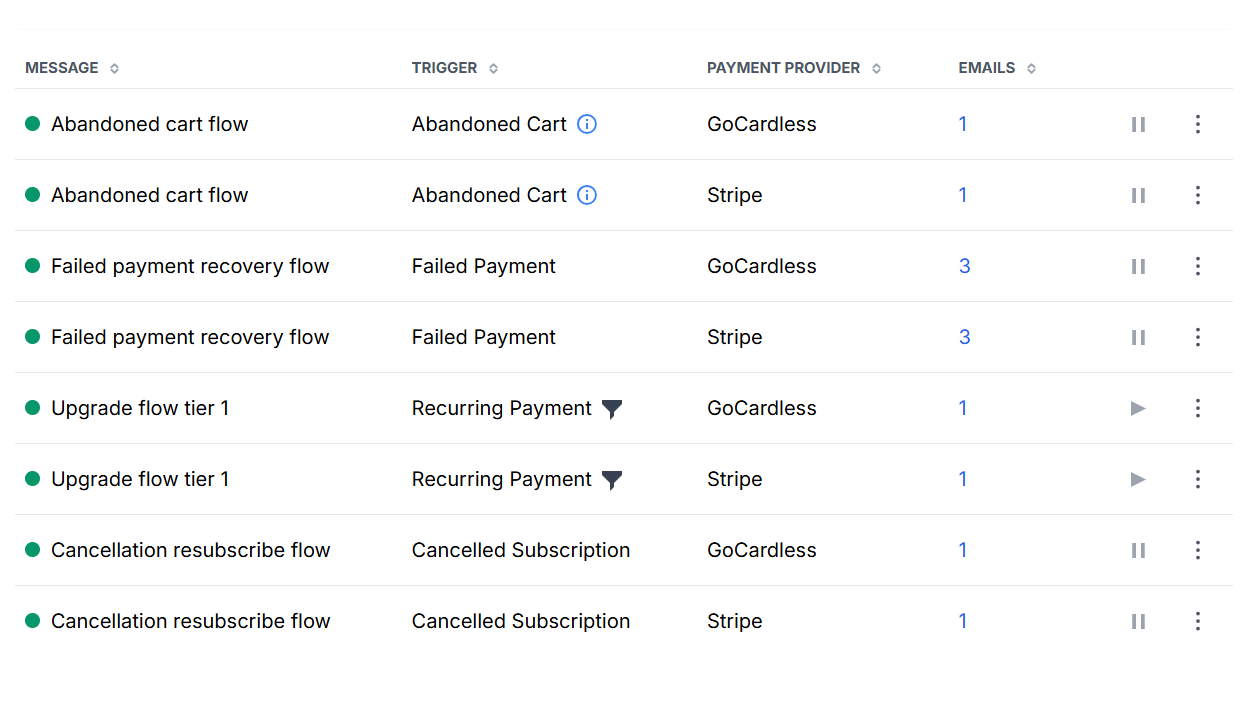
| Automation | Trigger | What it does |
|---|---|---|
| Donation thank-you | One-off payment confirmed | Personalised receipt and impact message. Fires on Stripe card confirmation or GoCardless payment-confirmed event. Also serves as a donation receipt for tax purposes. |
| Subscription thank-you | Recurring donation created | Welcomes the new monthly or annual donor. Sets expectations for their giving relationship and reinforces the decision to give regularly. |
| Abandoned cart recovery | Checkout started but not completed (fires after 24 hrs) | Re-engages donors who entered their details but didn't complete payment. Consistently one of the highest-ROI automations in the suite. |
| Failed payment recovery | GoCardless or Stripe payment fails | Three automated reminders at +0, +5, and +15 days. Separate sequences for GoCardless and Stripe. Each email contains a one-click re-authorisation link — no form-finding required by the donor. |
| Resubscribe flow | Subscription cancelled | A personalised farewell email presenting smart lower-amount options — automatically calculated as percentages of the donor's previous giving — inviting them back at a sustainable level. |
| Upgrade / upsell flow | Every 6 months after signup (recurring donors) | Invites recurring donors to increase their giving at the right moment in their giving cycle. Configurable in tiers by amount. Separate variants for GoCardless and Stripe donors. |
SmartRaise and your broader email marketing stack
Many organisations use an email marketing platform — Mailchimp, Campaign Monitor, Salesforce Marketing Cloud, or similar — alongside Salesforce for broadcast communication: appeals, newsletters, cultivation emails. SmartRaise's automations operate in a different lane. They are payment-event-triggered, not broadcast, and they fire on signals that your email marketing platform cannot see. The two approaches are complementary: a donor might receive a monthly newsletter from your Mailchimp account and a SmartRaise failed payment recovery email in the same month. These are different jobs, and both need doing.
What your Salesforce data unlocks: reporting and predictable revenue
Clean, structured donation data flowing into Salesforce is the foundation for everything your finance director, board, and fundraising team need to make confident decisions. Once SmartRaise is pushing confirmed Opportunities and active Recurring Donations into your CRM, here is what becomes possible.
Giving history and lifetime value
Every Opportunity linked to a Contact builds a complete giving history. From that record you can calculate lifetime value per donor, identify your most loyal supporters — not just your highest single givers — and distinguish between a donor who gave once three years ago and one who has given every month since. This distinction is the foundation of effective stewardship strategy: who to cultivate, who to upgrade, and who is overdue for a personal touchpoint.
LYBUNT and SYBUNT reporting
LYBUNT (Last Year But Unfortunately Not This Year) and SYBUNT (Some Year But Unfortunately Not This Year) are standard nonprofit reporting segments that Salesforce handles well once your Opportunity data is clean. These lapsed donor segments are typically your highest-converting reactivation audience — they've given before, they know your cause, and they can be reached with a personalised SmartRaise appeal and a prefilled form link that minimises friction to re-engage.
Recurring income forecasting
With active Recurring Donation records in Salesforce, your monthly recurring revenue is always visible. You can project forward 3, 6, and 12 months based on active subscriptions, model the impact of a 1% reduction in churn, and demonstrate to your board that you are building predictable income — not just riding appeal spikes. SmartRaise improves those projections directly: failed payment recovery reduces involuntary churn, the resubscribe flow reduces voluntary churn, and the upgrade flow increases the value of existing subscriptions over time.
Major donor identification
Salesforce's report builder makes it straightforward to surface donors who have crossed a lifetime giving threshold, or whose cumulative household giving exceeds a major donor floor. These contacts can be flagged for personal relationship management — moving from automated to individually stewarded giving, with SmartRaise providing the transactional foundation that makes the relationship case compelling.
Householding
Nonprofit Cloud's Household model links individuals to their household Account, so if two people at the same address both give, their contributions are visible at the household level as well as individually. This matters for planned giving conversations, major donor asks, and avoiding accidental double-solicitation. SmartRaise's email-based Contact matching links each new donation to the correct individual record, which Salesforce then associates with the correct household automatically.
Gift Aid and tax relief
UK organisations: Gift Aid
SmartRaise donation forms include an optional Gift Aid opt-in checkbox — "I am a UK taxpayer and I would like [Organisation] to claim Gift Aid on my donation." When a donor ticks this, their declaration is recorded against the Opportunity in Salesforce. Your finance team can run a Salesforce report to identify all Gift Aid-eligible donations across any date range, calculate the reclaim value at 25p per £1, and prepare HMRC submissions — without exporting to a spreadsheet or cross-referencing a separate system.
Gift Aid at scale: For organisations claiming Gift Aid across hundreds or thousands of donations per year, having those declarations captured consistently at the point of giving — and stored against the correct Opportunity in Salesforce — removes a significant manual reconciliation burden. The SmartRaise form collects the declaration; Salesforce stores and reports on it; your team just runs the report.
Setup: what SmartRaise handles, and what you configure
Getting SmartRaise running alongside Salesforce is a largely managed process. Most of the technical configuration — including the Salesforce integration itself — is handled by the SmartRaise team. You don't need an in-house Salesforce developer to get started.
What SmartRaise handles
- Creating your first donation form — with your brand colours, donation amount buttons, frequency options (one-off, monthly, yearly), and payment methods (Stripe card and/or GoCardless Direct Debit) configured.
- Configuring the Salesforce integration: Contact email-matching, Opportunity field mapping (amount, currency, stage, Gift Aid), and Recurring Donation creation for subscription donors.
- Setting up the full suite of email automations — thank-yous, failed payment recovery, abandoned cart, upgrade flow, and resubscribe — with your branding and copy.
- End-to-end integration testing, verifying that the Contact, Opportunity, and Recurring Donation appear correctly in your Salesforce environment before you go live.
- Form embedding assistance: providing the HTML embed snippet and confirming it displays correctly on your website.
What your team configures
- Domain authorisation in SmartRaise (
Globals > Authorisation) — whitelisting the domain(s) where your form will be embedded. - Branding (
Globals > Branding) — uploading your logo, setting your primary colour, and adding your website URL and support link. - DNS records for your custom send address: SPF and DKIM records are required for email deliverability (mandatory since February 2024 for Google and Yahoo inboxes). SmartRaise provides the specific record values.
- Any custom Salesforce field mappings specific to your org — for example, mapping a hidden SmartRaise form field to a custom Campaign field in Salesforce for attribution tracking.
Need help with setup? The SmartRaise team is at hello@brandresponse.cc. They'll walk through the Salesforce integration configuration with you, test alongside your Salesforce Admin, and ensure your first donation flows correctly into all three objects before you go live. Full documentation is available at the SmartRaise Help Desk.
Your 30/60/90-day action plan
Days 1–30 — Foundation
Salesforce integration configured and tested end-to-end. First donation form live with correct Contact and Opportunity field mapping. Gift Aid opt-in confirmed on Opportunity records (UK). Donation thank-you, subscription thank-you, and failed payment recovery automations activated. At least one verified test donation confirmed in Salesforce across all three objects (Contact, Opportunity, Recurring Donation).
Days 31–60 — Data quality and first campaigns
Historical donor data imported as Contacts in Salesforce, with most recent gift date and amount populated. Abandoned cart automation activated and tested. Recurring Donation objects verified for any existing subscribers migrated to SmartRaise. First LYBUNT report run and segment identified. First targeted SmartRaise appeal sent to lapsed donors with a prefilled form link.
Days 61–90 — Growth and retention
Upgrade flow activated for existing recurring donors. First fundraising dashboard built in Salesforce: confirmed MRR, pledged pipeline, lifetime value by donor, LYBUNT count. Resubscribe flow confirmed live. First upsell campaign run to a specific recurring donor segment. Payment recovery stats reviewed — calculate the revenue recovered that would otherwise have been lost.
At the end of 90 days, you'll have a clean, connected fundraising system: Salesforce as your donor intelligence and reporting layer, SmartRaise as your revenue engine. Every donation flows into your CRM automatically, every payment event triggers the right action, and no income is left on the table.
Further reading
- SmartRaise support — request customer documentation and setup guidance
- Salesforce Nonprofit Cloud — overview and resources for nonprofit organisations
- Fundraising with MailChimp and SmartRaise — if you use MailChimp alongside Salesforce for email marketing
Ready to connect SmartRaise to your Salesforce org? Book a demo — we'll walk you through the integration live, show you how Contact, Opportunity, and Recurring Donation records are created from a real form submission, and answer any questions about your specific Salesforce setup.


